


You set up a new node. Sync doesn’t finish. The logs show blocks being processed, but the speed is wrong. So you check the network first: peer count, firewall rules, bandwidth.
Not the wrong instinct. But in my experience, the real culprit is the disk.
How a blockchain node actually uses storage
A blockchain node doesn’t behave like a typical web server. Web servers mostly read; writes are logs. A blockchain node does something different: it stores and verifies every transaction the network has ever processed, locally. That data runs into hundreds of gigabytes or multiple terabytes depending on the chain.
The problematic phase is block sync. When a node first joins a network, it has to replay the entire transaction history from genesis to catch up to the current tip. During this phase, disk read patterns get intense. The node isn’t reading sequentially. It’s verifying multiple blocks in parallel, jumping around the disk at random. Running nodes across multiple chains in the Cosmos ecosystem, I measured read IOPS exceeding 5K io/s during this phase on some chains.
IOPS is the number of I/O operations the disk handles per second. The higher the number, the more concurrent read/write requests the disk is fielding.
Why cloud storage struggles with this pattern
AWS EBS and similar cloud block storage are network-attached. The disk isn’t physically inside the server. Every I/O request travels over a network hop to reach it. That hop adds latency to every single operation.
A bare metal server with NVMe is different. The drive sits in a PCIe slot, directly connected. No network traversal between the CPU and the disk.
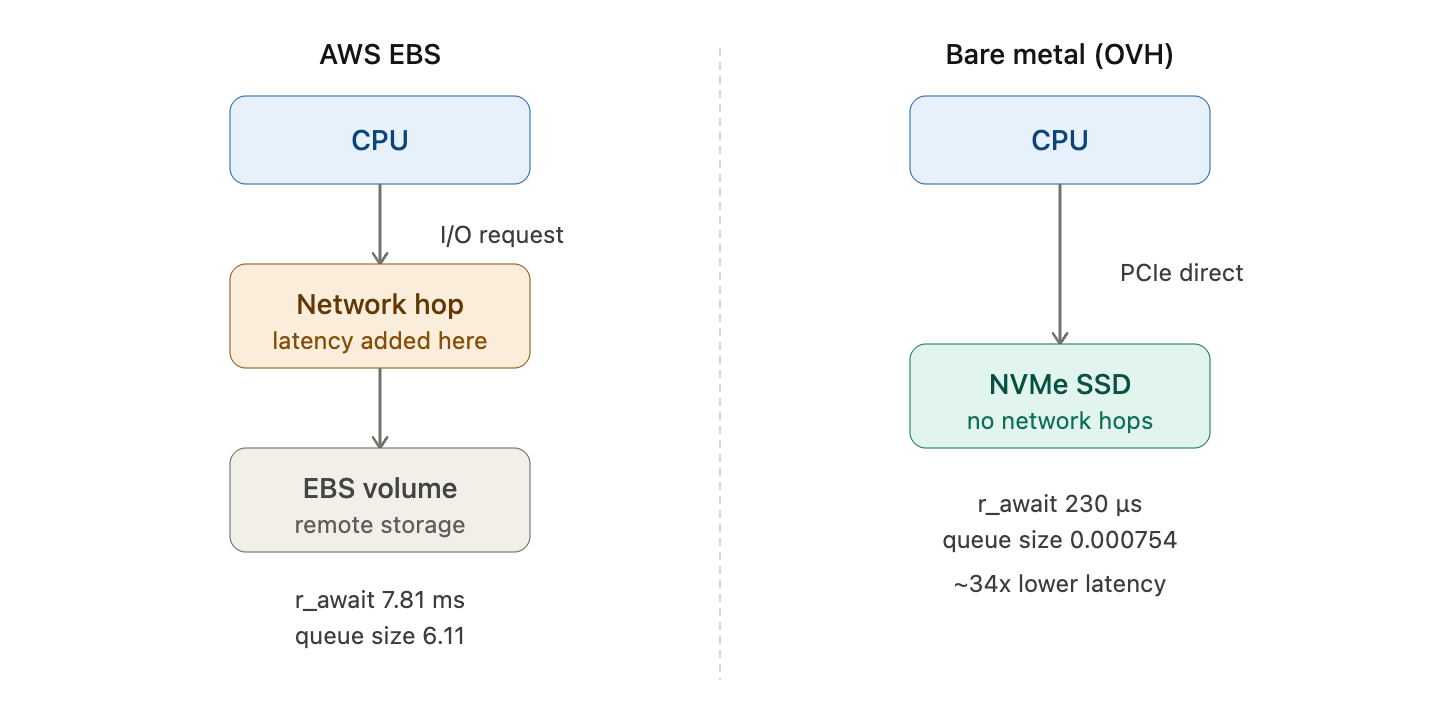
This structural difference shows up clearly in workloads with high random read IOPS, exactly what block sync produces. I ran the same chain on AWS EBS and an OVH bare metal server side by side.
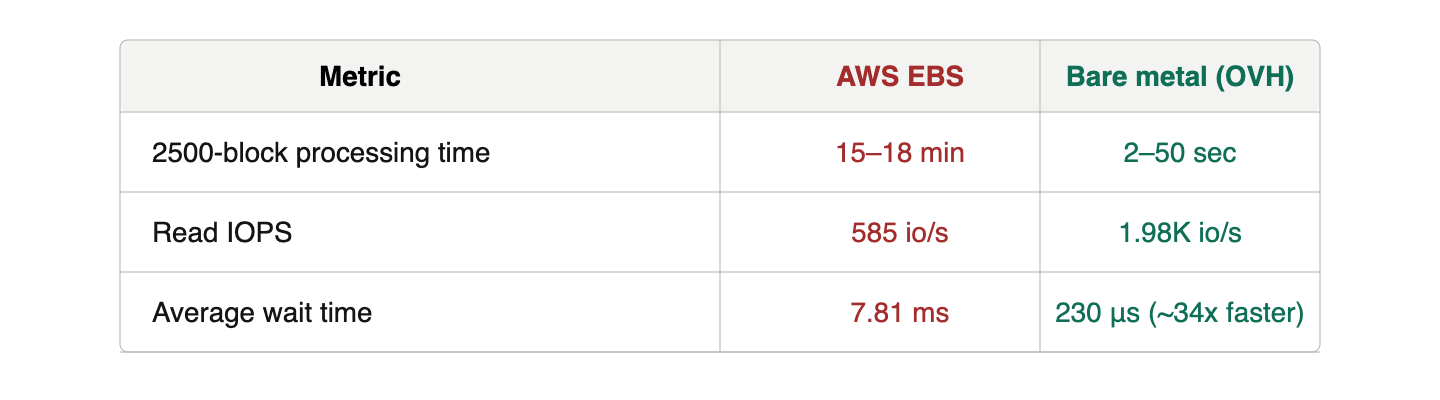
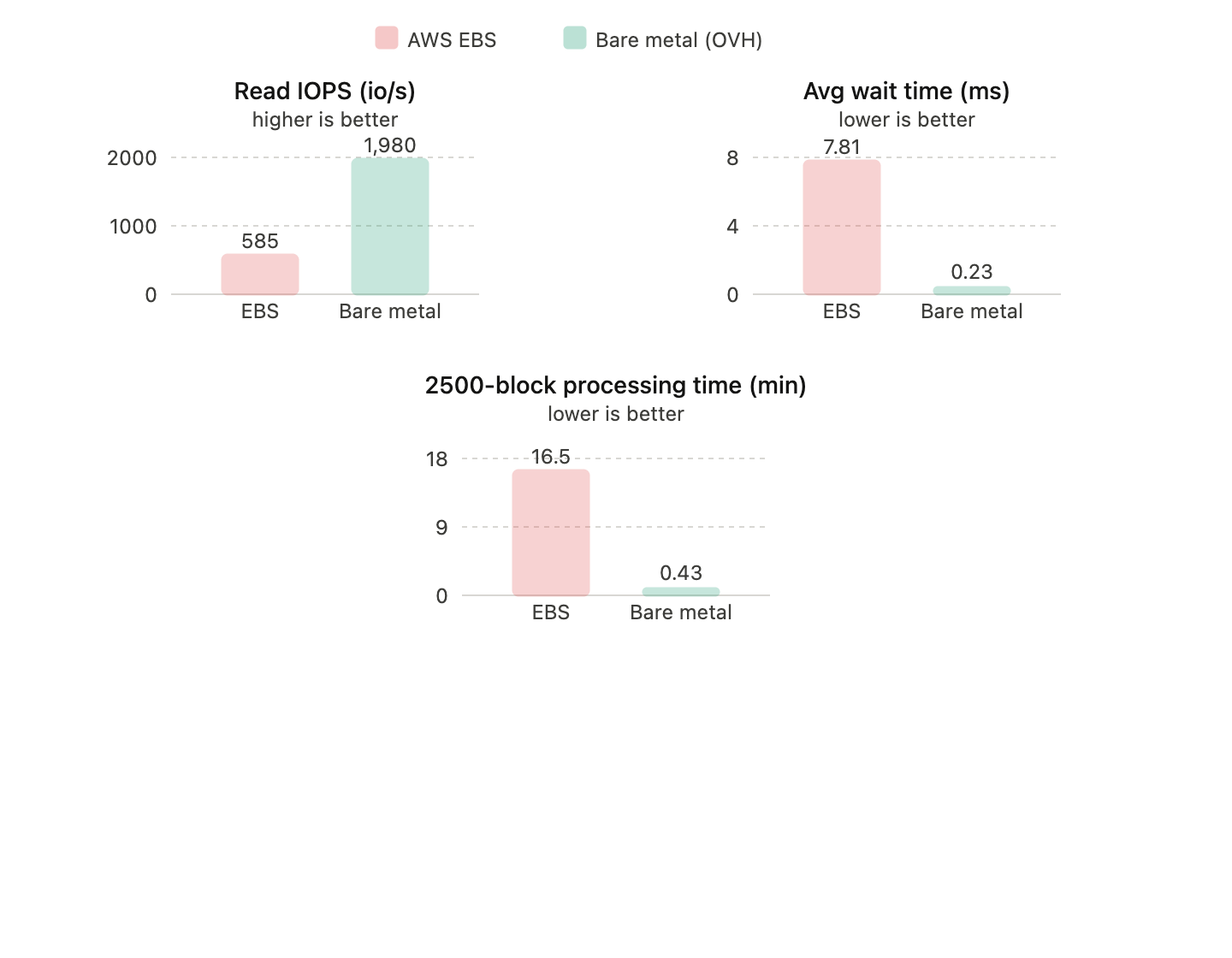
The wait time gap is about 34x. The queue size tells the same story. On EBS, I/O requests pile up waiting. On bare metal, they clear almost instantly.
Can’t you just provision more IOPS on EBS?
Yes. AWS EBS gp3 goes up to 16K io/s and 1000 MB/s throughput. Provisioning beyond the baseline (3K IOPS, 125 MB/s) closes the gap.
But the moment you go past the baseline, you pay extra. Compare the monthly cost of a high-spec EBS volume against a bare metal server and see which wins on performance per dollar. For workloads that need sustained high IOPS around the clock, the math usually doesn’t favor EBS.
The filesystem matters too
Storage choice is one variable. Filesystem is another. On Linux, the main options are EXT4 and XFS.
EXT4 works well under 1K IOPS and 200 MB/s. Block sync on most chains pushes past both thresholds. XFS handles high IOPS and parallel I/O better. For blockchain nodes, where block sync dominates the disk profile, XFS is the right choice.
Summary
If your node is slow, check the disk before anything else. Three concrete steps:
First, use bare metal NVMe over cloud-attached storage. The network hop in EBS is a structural disadvantage for random-read-heavy workloads like block sync.
Second, use XFS. It handles the IOPS and parallel I/O that block sync generates better than EXT4 does.
Third, measure your workload before changing hardware. Know which phase is slow before you pick a fix.
Upgrade the instance type last. In most cases, the answer is already in the storage layer.